Event Log
Inbound contact events from your own systems, and how they trigger journeys
Event Log is where inbound events sent to POST /api/v1/events land — a live feed of everything your own systems (an e-commerce store, a CRM, an internal app) have told Lemu about your contacts, and the entry point for the API Events trigger that starts a journey run from one of them.
What an event does#
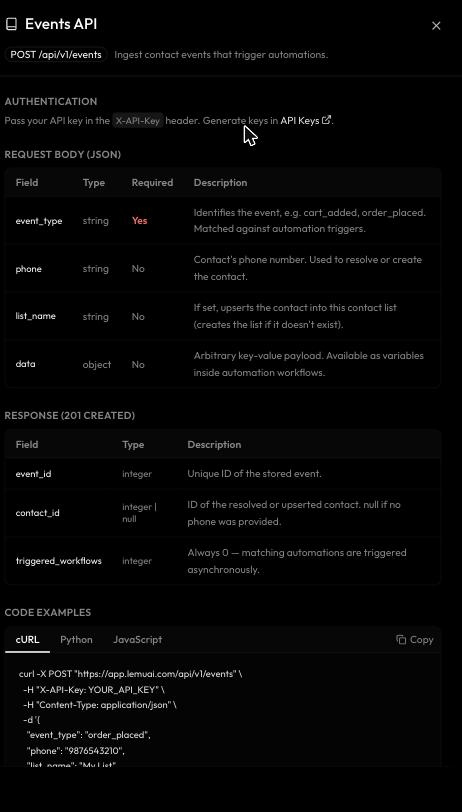
Every event carries an event_type (e.g. cart_added, order_placed), an optional phone number, and an arbitrary data payload. When an event arrives:
- Lemu resolves it to a contact by phone number, creating a new contact if none matches (this counts against your plan's CRM contacts limit). If
list_nameis included, the contact is upserted into that list, created if it doesn't already exist. - The event is stored and shows up in this log, with its type, phone, resolved contact, and payload fields as columns.
- Any active journey with an API Events trigger whose
event_typematches is queued to run, with the event's payload available as context variables.
Using the log#
The table can be filtered by date range and by event type using the controls above it, and searched by phone, name, or event type. Columns beyond the fixed ones (created at, event type, phone, contact) are derived from whatever keys your events' data payloads actually contain, so the table looks different for every organization depending on what you're sending.
Sending a test event#
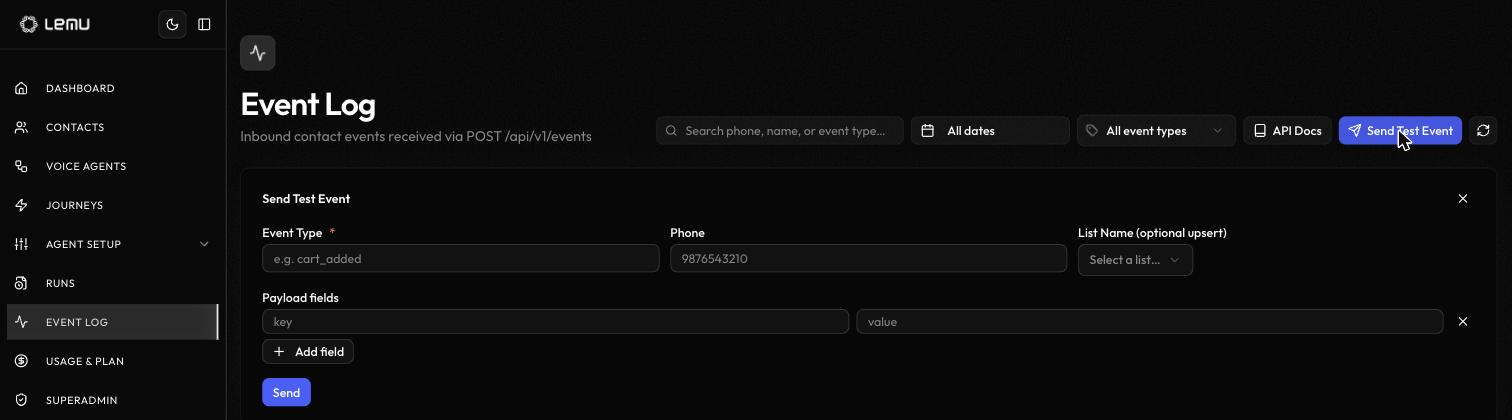
Send Test Event lets you fire an event from inside the dashboard without wiring up real integration code — useful for building and testing a journey's API Events trigger before your actual system sends anything. Fill in an event type, optionally a phone number and a list to upsert into, and any payload fields as key/value pairs, then Send. It goes through the same path as a real POST /api/v1/events call and can trigger real journeys, so use a phone number you don't mind creating a test contact for.
API Docs#
The API Docs button opens a reference panel for the endpoint in place — authentication, the request and response shape, and copyable code examples in cURL, Python, and JavaScript — without leaving the page. The same reference lives in the API Reference for linking or offline reading.